Showing posts with label video. Show all posts

Sunday, September 23, 2012

Emily (Finally) Playing the Guitar!

Soooo the other videos did not work out O_O

Well hope you enjoy! xD


Thankkkks for watching :D

Em out~

Friday, September 21, 2012

The REAL Laura

Here's a video of the REAL Lauramd555 that is on Youtube. (A lot of you have seemed curious about  how old she is.)


It's a little hard to believe that this is the girl that cussed my best friend out. This is the girl that made lots of my forumer friends quit....

Em out~

Sunday, September 2, 2012

Guitar Time! :)

I promised that I would post a video of me playing the guitar, so here it is! :)
This is C and G7 XD


I've only had 2 lessons so I'm not like a pro yet XD

Well hope you liked my song and bird :$

Em out~

Saturday, August 25, 2012

New Artbooks!


Hey guys! I made a new artbook, and it took me FOREVER lol :P

Anyways... my new goal is to get this to top pages! It would really make me happy :)

So check it out, Like it up, and thanks! :)

Oh, and also, check out Emily's new MSPBeat artbook! :)


It has information on how you could be on the MSPBeat Video! :D

Make sure you check it out too! ;)

Thanks for reading our blogs and supporting us! :)

-Lil'
Wednesday, August 22, 2012

Artbook Tutorial :)

Okay, so here's a tutorial on how to make an artbook! :) I remember I had a hard time figuring out how to make one when I started out xD
  • The arrow on the right side of the artbook is where you can get to all the selections below.


  • How to change the artbook's background:


  • How to add people to your artbook:


  • How to add text to an artbook:


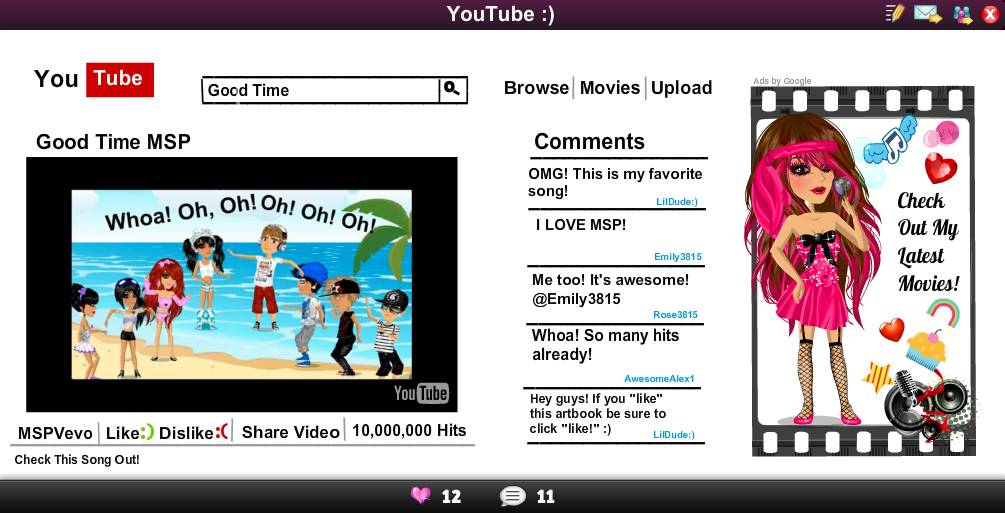
  • How to add a Youtube video to your artbook:


  • To save your artbook, first click the save button on the upper right hand side.


Hope this helps! :)

Em out~

Friday, July 20, 2012

MSP News Update

Sorry I haven't been on much! I've been working really hard on the Blog's video and haven't had much time to get news. Well, here's what's been going on in MSP.


  • There are a LOT of glitches since MSP was updated. Here's some of the ones that I've heard of.
  1. Players getting logged off. Sometimes you'll be logged off for no apparent reason. When it's time to spin the coin wheel, you get logged off too.
  2. You can only use one exclamation mark when messaging someone.
  3. Messages are being highly moderated. Some players are being banned from messaging for a few minutes. I personally have been banned from chatting for 5 minutes 3 times, for no apparent reason.
  4. Players are saying MSP is slower.
  • Players are leveling up extremely fast. How? They buy a lot of diamonds and use them to repeatedly spin the Fame Wheel! This only adds onto the hate diamonds are getting.
  • Now half of the top 14 Moviestars are Short Movies. Pretty soon they may be all of the top players....
I would do more, but my back is hurting really bad and I need some pain medicine, lol. 

Em out~


Thursday, July 19, 2012

MSP Beat Video Coming Soon!

I've not been able to post much today because I've been making a video for the Blog and been busy with my friend.

Well, I know you're going to ask if you can be in the video, so the answer is yes! I need people in my video saying MSP Beat! It can be in your status, your artbook, whatever you want! Just make sure you have it somewhere, lol. Please email me at Emily3815@gmail.com a picture of your MSP character with MSP Beat somewhere by them, or message me. Thank you!

Stay tuned in for the video!

Em out~

Tuesday, July 17, 2012

Artbook Help

A lot of people get confused about how to make artbooks. Here's how to change the writing and to add Youtube videos!

  • How to change the text color, font, or size
  1. Go to the right side and click the blue arrow that points to the left.
  2. Click "text". It should scroll down to show the text boxes.
  3. Select the text you want by clicking on it.
  4. There should be a blue oval with a flashing black line somewhere on your artbook. If it isn't there, then keep clicking the text box you want until you see it. It's a little hard to find, but keep trying.
  5. Once you're found the text box on your artbook, click on it and write something in it so you know where it is.
  6. Click the blue arrow from step one to close the side.
  7. Click on the text. A square with colors should show up and different kinds of fonts. Click what font or color you want the text to be.
  8. To change the size of your text, then Click on the blue squares on the outside of the text and (while holding the clicker) drag it in and out to make your text smaller or bigger.

  • How to add a Youtube video to your artbook/ make a playlist
  1. Click on the Youtube button in the top right corner or in Movietown.
  2. Go to the video you want to add.
  3. Make sure the video is in its normal size so you can see the comments. On the top right corner of the video is a yellow + sign. Click this. It might take a few seconds, but it will say "Video Added to Playlist."
  4. Go back to your artbook and click on the blue arrow in the corner. Click Youtube, then select your video. You can only add one video per artbook, sadly.

Hope this helps! If you have any ideas, questions, or concerns please leave a comment.

Em out~

Epic Harry Potter Videos


He's saying "trolololol".The meme comic Trollface says that. 


This is a classic!


This is my favorite XD


Hope you had a laugh!
Em out~